Squidbits – Greekgeek's Squidoo Blog Rotating Header Image

Thinky Thoughts

Google Panda/Farmer Update Cont'd

I thought I'd check back in on Squidoo and Hubpages now that the Google Farmer Update (Panda update) has had some time to work. Short-term results can suggest major upheavals, but it's the long-term stats that really mean something.

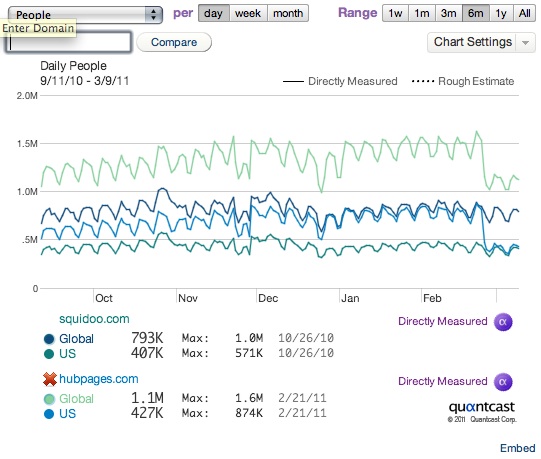
Here's today's traffic charts from Quantcast, showing that Hubpages traffic has stabilized:

Google Panda Update Impact on Hubpages and Squidoo

Keep in mind that the update was only for Google's US search engine. It hasn't yet been unleashed globally. The drop in U.S. users is included in "global" as well as "local" results.

My prediction, based on what I'm seeing, is that after this change, Hubpages' traffic is going to be nearly the same as Squidoo's. It already is within the US.

The Spam's the Thing?

Jennifer Ledbetter of Potpiegirl.com made a mini study of specific spam phrases confirming by the numbers my guess in my last post on the Farmer Update: Squidoo's ongoing spam crackdown means it has fewer (but alas, still some) pages on the most spammy topics than Hubpages and several other sites. This DOES explain why ehow.com didn't lose places in the SERPs: it has even fewer pages matching these spam phrases.

Jennifer didn't test this, but we both also argued -- in different ways -- that Hubpages' much, much stricter policy on outbound links may be causing it some trouble. She pointed out that links on Hubs are nofollowed until you've reached a certain status. I related my experience of having all my hubs locked for having one link on each of them to cite the source of my photos. Squidoo's got a nine outbound link per domain limit, instead, and it nofollows affiliate links in its merchant modules.

Various other ideas have been thrown out to explain the change. Another thing I pointed out is the significantly lower bounce rate of Squidoo compared to Hubpages, ezinearticles, and (of course) mahalo.

There's just one problem.

The Quantcast traffic charts show Hubpages U.S. traffic simply dropped back to Squidoo's levels.

If my explanations and Potpiegirl's  guess about outbound links were correct, Squidoo should now be outperforming Hubpages. But it's not. They're now about the same.

Jennifer's spam study shows that Squidoo has fewer pages than Hubpages on the spammy topics she chose to test, but not all that much less. The last phrase she checked ("tv for pc") actually had more pages on Squidoo than Hubpages. (It really shouldn't be filtered as spam; how to watch television on a PC is a reasonable query. It's just gotten targeted by a lot of spammers trying to cash in on a popular search).

So my vote is on the spam being the deciding factor -- as it should be -- about how Google's picking "quality" sites.  Let's keep reporting and flagging it when we see it, folks, and for goodness' sake don't write on a Squiddont topic! Also, don't give up on Hubpages. It's gotten humbled, but it's no worse off than Squidoo. And keeping eggs in different baskets is always a good practice.

The Google Farmer Update and Squidoo

Google Farmer Update: Early Returns

So, the manure has hit the rotary blades, and we're starting to see some results from Google declaring war on so-called "Content Farms" in 2011. (When even mainstream news media hears about it, you know it's big.)  Various pundits and industry experts had ideas on what content farms are, but until we saw the traffic shake-up, we couldn't be sure how Google defined them.

Of course, I hear the little Michael Martinez devil's advocate on my shoulder screaming "insufficient sample size, short-term data is inferior to long-term data"! but with that caveat, we've already got some apparent results.

Squidoo users, for the most part, haven't seen any changes in traffic:

Squidoo Traffic Farmer Update


Hubpage users are feeling some pain (it's all over their user forums), which is reflected in the Quantcast traffic data:

Hubpages Traffic Google Farmer Update


Go play with Quantcast to test your own favorites. Some aren't available yet (ehow, ezinearticles), or are CLOAKED (mahalo.com, surprise surprise) so Quantcast can't measure them.

For the big picture, see Danny Sullivan's "Number Crunchers: Who Lost In Google’s “Farmer” Algorithm Change?" on SearchEngineLand, although Squidoo is too small a squid to have attracted detailed stat analysis by the experts, unfortunately.

My own traffic stats reflect what Quantcast saw: in fact, my traffic has been increasing slightly since the change (repeat: limited sample size) not dropping.

So what does this all mean for Squidoo users, most of whom publish on a variety of other platforms as well (including Hubpages)?

(more...)

The Tao of SEO

The most popular form of SEO boils down to:

  • researching popular searches related to one's topic
  • scouting the competition for those terms and one's niche
  • strategic use of keywords on a webpage and in links to that page

But "Search Engine Optimization" does not only mean keyword research, even if that's an important and powerful method. Nor does SEO only mean optimizing for Google, even if that's usually the biggest source of search engine traffic in the English-speaking world.

"Search engine optimization" simply means techniques for getting search engines to send traffic to your pages. We can talk about linkbuilding (which I don't do enough of), on-page optimization, image optimization, Squidoo tags, cross-linking -- but it all goes back to people searching for things, and finding those things on your pages.

Things.

People. Places. Objects. Nouns.

The tao of SEO is speaking in terms that someone else cares about, wants to know about, or might look for. The more concrete, specific vocabulary you use, the more likely your words may intersect with things people search for.

Don't just say you took your dog to the park. Say your dog is a labradoodle, and you take it to play frisbee at Peppergrass Park. Don't just say you like fish. Say you're crazy about ikura (salmon roe) sushi with a dab of wasabi.

Somewhere, somebody might be looking for precisely those things.

They may append certain adjectives and descriptives to the nouns: cheapest, free, unique, homemade, best, review of, top ten. But nouns are common and essential in most searches.

There is another kind of popular search besides noun-phrases: question-phrases like "how can I...?" or "what is the HTML code for...?" or "how many...?" or "how hot is...?" or "When did....?" These often make great section headers or first sentences of paragraphs.

In my creative writing, I find myself snipping out excessive use of names and description, favoring nuanced language that implies more than it says. On my Squidoo pages, I replace pronouns with nouns and say what I mean. Search engines can't read between the lines.

Of course, people can read between the lines, so you have to be careful not to overdo it. A huge mass of nouns will lose reader interest, like reading the phone book aloud. But usually, you can state the obvious in a way that's compelling to readers as well as helpful to search engines.

The tao of SEO is to find phrases that express what you want and need to say in concrete, specific ways that search engines notice. Then your pages won't just rank for one or two big keyword searches. They'll pick up all kinds of little searches, phrases that perhaps no one has ever searched before,  and that your competition has not tried to optimize for.

You can't always write concretely. Sometimes you need to write on abstract concepts, ideas, beliefs, opinions, feelings that just don't lend themselves to specific, searchable language. But when you can, state precisely what you mean. Skip filler. Skip introductions. Get to the point.

Get Traffic By Designing for Visually Impaired Web Users

Enhanced web accessibility means enhanced SEO

Visually impaired users use screen readers, i.e. voice software, to browse the web. There's a lot more people surfing the web this way than you'd think. They are dependent on the text we use and the organization of web pages to help them navigate.

Search engines, too, are text-dependent. They need keywords to help them analyze page content. They need structure like headings and  image file names to tell them what each section and image is. They use words in bold, links, and certain key parts of each page to help them learn their way around.

Designing for human users and search engines often forces us to juggle two conflicting priorities: human readability versus targeting keywords. In this case, we've got a win-win situation: designing for people will help search engines get what we're trying to say.

A Squidoo Example

A Squidoo page which I just critiqued in SquidU's Critique Me forum got me to thinking about all this. It's a simple page: Funny Pie Charts. It's a collection of funny pictures. The page's author did a good job of making the page more accessible for search engines by choosing a short phrase and using it in the image's file name, alt text, and title text. (Title text is optional text that pops up when you hover your cursor over a link. You put it into  link tag like this:  <a href="link goes here" title="hover text goes here">clickable text</a>. Each image was linked back to the page it came from, so there was a place to include title text).

I suggested that the "Funny Pie Charts" author could leverage search engine traffic even more by varying the phrase in the image file name, alt text, and title text. Then I thought about people using screen readers. They won't get the jokes, because the jokes only appear in the graph itself. For example, there's a graph on "What Zombies Do" that includes "Dance with Michael Jackson".

If the alt-text for each image included the funniest two or three options from the graph, then people using screen readers could enjoy the page too. And search engines would see those words. Win!

The Long Tail, Again

If you write humor or any content with web accessibility in mind, you're chasing the long tail: that large untapped reservoir of niches, under-served target audiences, and people with special interests and intense passions who will care more about your page on wombat widgets than the huge mainstream population who read any sort of widget webpages or buy any old widgets. You may not be able to compete in the widgets market, because the widget market is saturated. There's a million widget webpages and widget producers and big-name widget brands out there. But by golly, you can compete on wombat widgets.

So write for the screen reader crowd. Give them content to read and funny pages to laugh about which they'll share and like and email to their friends. The next time you make a Lolcat, give it an alt-name that includes the caption found in the graphic, and let them enjoy the joke.

How to Design Pages for Screen Readers

How do we design for screen readers? There's a lot of good guides out there, but here's a lengthy yet incredibly information-packed Guidelines for Accessible and Usable Websites that includes all kinds of tips about how people with screen readers navigate webpages and how to shape your content to help them along.

Here's five things which we can do:

  • Use alt-text to make clear what's in a picture, especially any text in the graphic. Exception: don't waste time identifying a decorative graphic that provides no content, only a visual accent.
  • Start each paragraph, header, and link with words that give readers a clue what's in the rest of that section.
  • Establish patterns and repeat them. For example, cookbooks present recipes in the same order on every page: ingredients on the left, graphic on the right, step-by-step instructions below.
  • When possible, avoid terms that voice software is likely to mangle. Abbreviations, cute spellings, and compound words often come out funny.  For example, "homepage" gets mispronounced, so use "home page," two words. In this post, I've used "web page" and "file name" instead of running them together as I usually do.
  • Don't waste readers' time. Be brief. (Oh, I have a hard time on this one.)

Speaking of which:

THE END.

Digg the SEO Vampire: It Drinks Your Backlinks Dry

Just in time for Hallowe'en, I have an SEO horror story that's happening right now. You may even be a victim!

You think submitting your page to Digg will help SEO, right? Or at least, it can't hurt, can it?

Ha. Ahaha. Ahahaha.

In September '09, Digg announced that links would be NoFollow until they proved themselves worthy (lots of Diggs). And I vaguely remember a flap about the DiggBar totally screwing up SEO. I didn't follow the story closely because I don't use social media for SEO: social media means promoting your site to people, whereas SEO means promoting your site to search engines.

(more...)

"You Have No Right to Traffic"

I was just rereading Seth Godin's The Nine Free Things Every Site (Or Lens!) Should Do, which is the link SquidU's Answer Deck gives you if you click "How do I get more traffic?"

As usual, Seth is simple and short, whereas my own 3-part Squidoo tips tutorial on how to build web traffic is in-depth and too long.

One of Seth's points jumped out at me:

You have no right to traffic. If you're lucky, and GOOD, you earn some.

You'll earn it when you do something daring, interesting, useful, provocative, free, compelling, emotional or urgent.

Hurry.

I've said this in other ways, but never quite so bluntly: YOU HAVE NO RIGHT TO [WEB] TRAFFIC.

There are millions of fascinating, useful, incredible, wonderful, exactly-what-people-want web pages out there. A web user will never see more than a tiny fraction of them. So why should anyone pick your page, out of all those pages, to visit? Why stay there? Why read it?

It's up to you to make it worth their time.

(more...)

SEO Experiment - Make One Hit Worth Two

Yep, back in the saddle. Dissertation is keeping me busy! However, I've hit a few modest SEO tips in the course of updating and making some new lenses.

First up:  CLONE YOUR VISITOR.

This is an idea I'm trying, not yet proven, but it makes sense to me.

Situation: A series of lenses, a sequence of lenses that are all linked up, like different pages of an article.

Query: Which of them should you give the best keyword phrase to for the URL/title?

In the past, I've given it to the first page, the gateway lens, so to speak. But that's linear thinking.

(more...)

Squidoo Lensrank Tip: Cite Sources

Guess what? My lenses aren't all original. Of COURSE not!

My "How to Get Your Lens Found" tutorial includes some tips I learned from PotPieGirl and Spirituality and Fluffanutta, and I used to cite Mr Lewissmile, before I decided I disagreed with some of his tricks and changed my recommendations. My CSS Codes Tutorial includes something I call CSS Kung Fu, which I learned from Glen. On baseball lenses, I've got links to forum discussions on MLB boards.

And ya know what? I thank these people for their help, and pay them by sending them traffic. It's only fair!

On a pragmatic level, those links represent a large part of the clickthroughs for my lens. Repeat after me, squids: clickthroughs boost lensrank; lensrank determines payout tier.

There are several other ways that being honest about your sources can actually benefit your bottom line. (more...)

Links and Copyright: How to Solve Copyright Issues on the Web

As a writer and sometime teacher, I care a great deal about copyright and vigorously reject plagiarism. At the same time I appreciate that the web lets people combine material, collaborate and build on each other's work in ways that were not possible before information and content were available instantly and on a large scale. These "mashups" can provide value and unique content that were not foreseen by the original authors. How can we preserve authors' rights while encouraging the potential of this new medium? This essay suggests a possible solution.

(more...)